

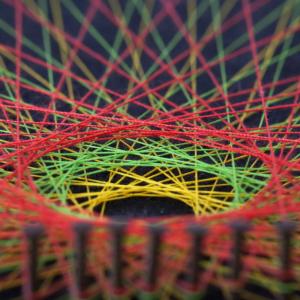
'The secret patterns behind string art' is one of our new teaching sequences for V9
- On the 'In this sequence' tab you'll find all the lessons in this sequence, a suggested implementation plan and curriculum alignment.
- The 'Behind this sequence' tab shows how key mathematical ideas develop over the sequence.
- Have you taught this sequence? Use the Feedback button to let us know how it went!
Lessons in this sequence

Task 1 • One line
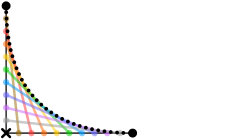
Students recreate an image of curves made entirely from straight lines. They explore how to describe locations on a grid and use this knowledge to help draw the first section of a string art design by hand.

Task 2 • Drawing in Scratch
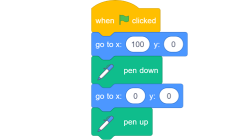
Students use Scratch to draw the same image they drew by hand in Task 1. The pen blocks needed to draw lines are introduced and patterns in the repeating code are used as a precursor for using loop structures.
Task 3 • One instruction, 11 lines
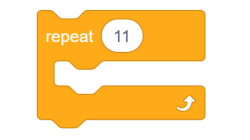
Students examine the code they wrote in Task 2 and ask whether 11 separate instructions are really necessary. They identify what stays the same and what changes, introduce variables as placeholders for changing values, and build a loop that draws all 11 lines from a single instruction.
Task 4 • The other side of zero
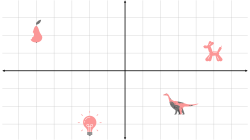
Students learn that negative numbers can describe direction and apply this knowledge to draw the second quadrant of the design both by hand and using Scratch.
Task 5 • The whole picture
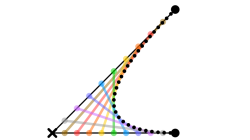
Students complete the full four-quadrant string art design in Scratch, then use the same algorithm to create their own designs by changing the reference lines used to anchor each line in the image.
The Australian Academy of Science supports and encourages broad use of its material. Unless indicated below, copyright material available on this website is licensed under a Creative Commons Attribution-NonCommercial-ShareAlike 4.0 International (CC BY-NC-SA 4.0) licence.
Curriculum and syllabus alignment
Year 6
By the end of Year 6, students use integers to represent points on a number line and in the Cartesian plane.
They identify and explain rules used to create growing patterns. Students create and use algorithms to generate sets of numbers, using a rule.
Students locate an ordered pair in any one of the 4 quadrants on the Cartesian plane.
Number
Recognise situations, including financial contexts, that use integers; locate and represent integers on a number line and as coordinates on the Cartesian plane
Algebra
Create and use algorithms involving a sequence of steps and decisions that use rules to generate sets of numbers; identify, interpret and explain emerging patterns
Space
Locate points in the 4 quadrants of a Cartesian plane; describe changes to the coordinates when a point is moved to a different position in the plane
An image of curves made entirely from straight lines raises a deceptively simple question: how could we instruct a computer to draw this? Students build knowledge of coordinates, discover a pattern connecting every line in the design, turn that pattern into an algorithm, and extend their thinking into negative numbers as they complete a four-quadrant design. A predict/code/check habit runs throughout, giving students a consistent method for testing their thinking and debugging their code.
Sequence framework
| Task | Key idea | Students’ mathematical activity | Representation | Context |
| 1 | Any point on a grid can be described using exactly two numbers. | Students draw the first quadrant of the string art design by hand, and discover a numerical pattern connecting every line in the section. | Cartesian plane, coordinate pairs, table of values. | Drawing the first section of the string art design by hand. |
| 2 | A computer can draw lines using coordinates, and errors in code can be found and fixed systematically. | Students translate their hand-drawn lines into Scratch code one at a time, using the predict/code/check routine to test and debug their work. | Scratch code for individual lines, Cartesian plane. | Recreating the hand-drawn string art design in Scratch. |
| 3 | A repeating pattern in code can be replaced with a single instruction. | Students identify what stays the same and what changes across the code for their 11 lines, introduce variables, and build a loop that draws all 11 lines from a single instruction. | Table of values, variables in Scratch. | Using the pattern to make the computer do the work. |
| 4 | Negative numbers describe direction. | Students extend their coordinate system to include negative numbers, draw Quadrant 2 by hand, and adapt their loop using the minimal possible change to complete that section of the design. | Four-quadrant Cartesian plane, signed coordinate pairs, loop code in Scratch. | Extending the string art design into the remaining quadrants. |
| 5 | Changing one part of a rule produces a related but different design. | Students complete the full four-quadrant image, consolidate their understanding of coordinate signs across quadrants, and explore what other designs the same algorithm can produce using different reference lines. | Four-quadrant Cartesian plane, loop code in Scratch. | Completing the full string art design and exploring variations. |

'The secret patterns behind string art' is one of our new teaching sequences for V9
- On the 'In this sequence' tab you'll find all the lessons in this sequence, a suggested implementation plan and curriculum alignment.
- The 'Behind this sequence' tab shows how key mathematical ideas develop over the sequence.
- Have you taught this sequence? Use the Feedback button to let us know how it went!